

The Short Answer
At Mag-Knight Die Cutting, we hold critical (key) features to ±0.005″, general features to ±0.015″ unspecified to ±0.032″ .
The tolerance you can actually get depends on the material, its thickness, the size of the part, the feature type, and the cutting process. Call out tight tolerances only where the part’s function needs them. That keeps cost down and makes production more repeatable.
If you are an engineer designing a gasket, foam pad, insulator, spacer, or adhesive part, this guide covers what die cutting can realistically hold, why soft materials act differently from metals, and how to dimension your drawing so the quote comes back fast and accurate.
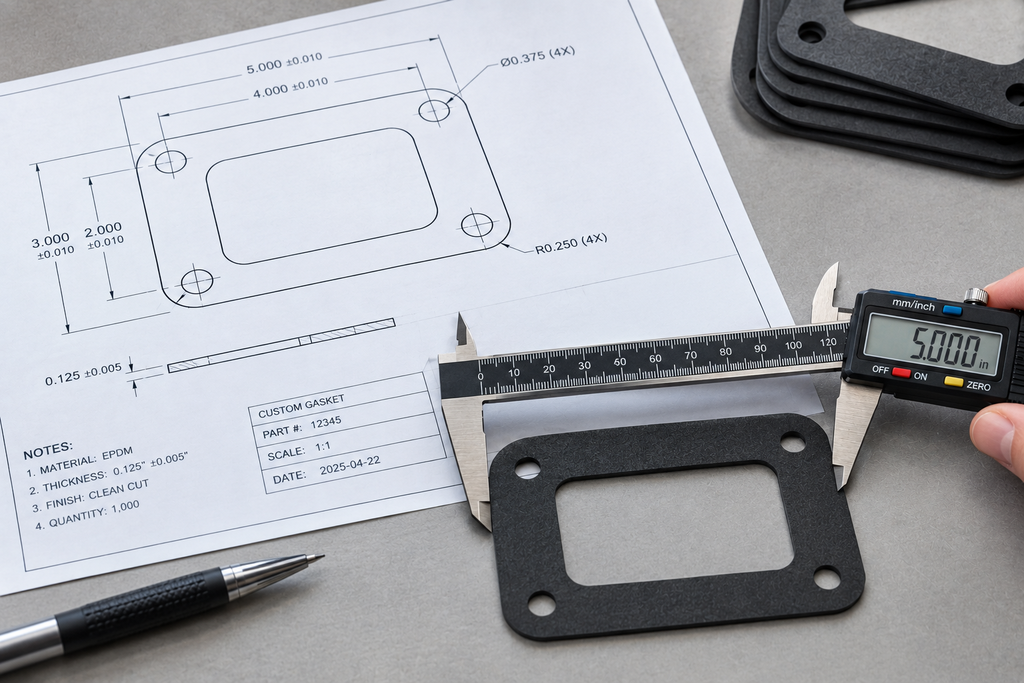
[Image placeholder: Close up of a die cut foam gasket being measured with digital calipers on an inspection table]
Mag-Knight Tolerance Capability
| Feature type | Mag-Knight tolerance | Typical examples |
|---|---|---|
| Key / critical features | ±0.005″ | Locating holes, sealing edges, alignment features, hole to hole spacing |
| General features | ±0.015″ | Outside perimeter, noncritical cutouts, cosmetic edges, tabs |
| Material thickness | Per material manufacturer spec | Foam, rubber, film, and felt thickness is set by the raw stock |
Tip: Mark critical dimensions clearly on the drawing, for example with a key characteristic symbol or a note like “CRITICAL ±0.005″.” All other dimensions can then default to ±0.015″ in your title block.
Tolerance Comparison Chart
Achievable tolerance by feature type (smaller = tighter)

General features      ±0.015"  ███████████████
Key features          ±0.005"  █████
What Affects Die Cutting Tolerances
1. Material Type and Hardness
Soft, compressible materials like open cell foam, sponge, and felt deform under the cutting rule and then recover. That makes them harder to hold tight than firm materials like polyester film, polycarbonate, or rigid rubber. Mag-Knight works with a wide range of substrates. The materials guide can help you match a material to your tolerance needs.
2. Material Thickness
Thicker material usually means wider tolerances. As the rule goes through thick foam or rubber, the material compresses, so the cut edge can come out slightly concave or tapered. For thick parts, tell us whether the dimension applies at the top face, the bottom face, or the midline.
3. Part Size
Larger parts build up more variation across their length. A ±0.005″ callout on a 1″ locating hole spacing is realistic. The same callout on a 30″ perimeter in soft foam may not be.
4. Feature Geometry
Small holes, narrow bridges, and sharp inside corners are harder to cut precisely. Steel rule has physical thickness, so features close together need review. Use internal corner radii at least equal to the material thickness when you can.
5. Cutting Process
Each process has its strengths:
| Process | Best for | Tolerance considerations |
|---|---|---|
| Steel rule die cutting | Repeat production parts | Very repeatable once the die is built |
| Laser cutting | Prototypes, intricate shapes, no tooling | No die wear, clean edges in many plastics and films |
| Metal cutting | Steel, aluminum, stainless, copper, brass | Tolerance depends on metal type and thickness |
| Rapid prototyping | Checking fit before production | Confirms tolerances in your real assembly |
Tip: If you’re not sure which process will meet your tolerance, send the drawing. Mag-Knight’s engineering review will recommend the process that holds your critical features at the lowest cost.
6. Adhesives and Laminations
Pressure sensitive adhesive, liners, and laminated layers add thickness variation and can shift during lamination. Put the full layer stack on the drawing and say whether dimensions apply before or after lamination.
How to Specify Tolerances on a Die Cut Drawing
- Dimension from functional datums. Use locating holes or mating edges, not arbitrary outside edges.
- Use a general tolerance block. For example: “Unless otherwise specified: ±0.015″.”
- Flag only the true critical features at ±0.005″. Sealing edges, alignment holes, and clearance features are the usual candidates.
- Account for compression. Give the free state dimension and note whether measurement happens compressed or uncompressed.
- State the measurement method. Calipers, optical comparator, or vision system can give different readings on soft materials.
- Send vector CAD with the PDF. DXF, DWG, or AI along with a dimensioned PDF.
Tip: Tolerancing every feature at ±0.005″ adds inspection time and cost without improving how the part works. Save tight control for the features that matter.
How Mag-Knight Solves Common Tolerance Problems
| Engineering problem | How Mag-Knight helps |
|---|---|
| “My foam gasket doesn’t seal consistently.” | We review material density and compression, and hold the sealing edge to ±0.005″. |
| “My locating holes don’t line up in assembly.” | We dimension holes from your datums and control hole to hole spacing tightly. |
| “My current supplier’s parts vary lot to lot.” | Steel rule dies and controlled production give repeatable results across runs. |
| “I need to verify fit before buying tooling.” | Laser cut prototypes let you test tolerances before committing to a die. |
| “I don’t know what tolerance to specify.” | Our free engineering review, led by a mechanical engineer, recommends realistic callouts. |
Common Tolerance Mistakes to Avoid
- Applying ±0.005″ to every dimension on the drawing.
- Leaving out a general tolerance block.
- Using machined metal tolerances on soft foam or sponge.
- Ignoring material thickness variation in stack ups.
- Not saying whether dimensions apply before or after lamination.
- Dimensioning from outside edges instead of functional datums.
- Leaving out the measurement method for compressible materials.
- Sending only an image file with no dimensioned drawing.
Benefits of Getting Tolerances Right
Realistic, function based tolerances lower part cost, speed up quoting, cut down on rejected parts, and make production more consistent. With Mag-Knight, key features are held to ±0.005″ and general features to ±0.015″. Add our engineering support and you get parts that fit your assembly the first time.
Ready to check your part? Look at pricing information, see how to design a part for die cutting, and send your drawing through the quotation request page for a free engineering review.
Frequently Asked Questions
What tolerances can die cutting hold?
Mag-Knight holds key features to ±0.005″ and general features to ±0.015″. The final capability depends on material, thickness, part size, and geometry.
What is a standard die cutting tolerance?
A typical general tolerance for die cut parts is around ±0.015″. Tighter tolerances like ±0.005″ are used for critical features such as locating holes and sealing edges.
Can foam be die cut to tight tolerances?
Yes, with some limits. Firm, closed cell foams hold tighter tolerances than soft, open cell foams. Mag-Knight can recommend a foam that meets both your performance and tolerance needs.
Is laser cutting more accurate than die cutting?
Not always. Laser cutting works well for prototypes and intricate shapes with no tooling. Steel rule die cutting is very repeatable in production. The better choice depends on material, volume, and feature requirements.
How does material thickness affect die cut tolerances?
Thicker materials compress more during cutting, which can taper the cut edge and widen tolerances. Thin films and rigid sheets usually hold tighter tolerances.
How should I call out tolerances on a die cut part drawing?
Use a general tolerance block, such as ±0.015″, and flag critical dimensions separately at ±0.005″. Dimension from functional datums and note whether measurements are taken compressed or free state.
Do tighter tolerances cost more?
Yes. Tight tolerances on every feature add inspection time and can require special tooling. Controlling only the critical features keeps cost down.
Can Mag-Knight review my drawing for tolerance feasibility?
Yes. Mag-Knight offers a free engineering review and will recommend realistic tolerances, materials, and processes. Submit your drawing on the quotation page.